
Running an Arizona Statewide Case Search
The Arizona Judicial Branch runs a free statewide service. It is called Public Access to Court Case Information. Participating courts feed it case data. Think of it as a locator. You can search by party or business name, or by case number. The results list the court, county, and case type so you can confirm the match. A separate criminal minute-entry search covers selected Superior Court matters. Neither view promises every local Arizona case or every filed document.
Use the statewide search to find a likely case and learn which court holds it. A result can show identity, status, and dated activity. That short index is still not the complete Arizona court docket sheet. The county or lower-court clerk keeps the official record, fixes errors, and issues certified copies. Start from a citation, notice, or court name when you can. One party name often pulls up several Arizona cases.
- Open Arizona Public Access and complete the human-verification step.
- Choose a party or business name search, or enter the Arizona case number if known.
- Read the court, county, and case type on each Arizona result before selecting a match.
- Use the Arizona local clerk or county court system for the full docket and official documents.
| Visible Control | What It Does | What Is Verified |
|---|---|---|
| Retype the characters from the picture | Text CAPTCHA | Required before the search controls become available. |
| Submit | Button | The portal says to click it; pressing Enter may not submit. |
| Case-search fields after CAPTCHA | Not exposed in the static page | The validator confirms last name or business name and case number search modes, but the remaining controls were not independently visible. |
Arizona CAPTCHA Is Not a Case Filter
The verification image is an access step. It does not narrow Arizona case results. Public Access says the CAPTCHA controls excessive high-volume use. So a failed or unreadable challenge means nothing about the case itself. The file is not sealed, out of jurisdiction, or missing. The gate simply rejected you. Reload the image or use the spoken-CAPTCHA control, then submit. Public Access also posts a weekly update through Wednesday, refreshed Friday. A brand-new Arizona filing may lag a few days behind.
Treat any result as public reference information rather than an official Arizona court record. When you need a current answer, go to the holding court. The Arizona Public Access CAPTCHA gate page shows this verification step ahead of the search controls.
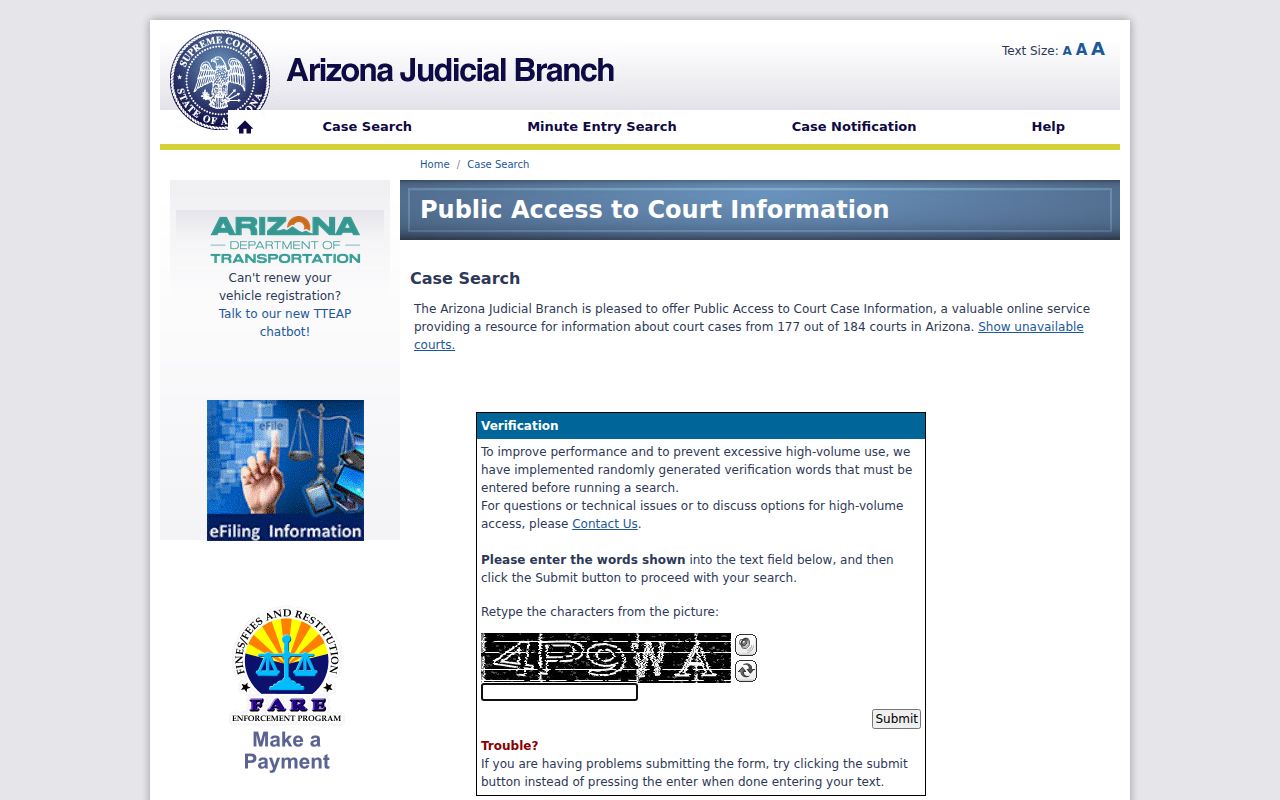
The page's static text lists no county, court, or year dropdowns. No filter choices can be confirmed from it, so assume none until the search controls appear.
Arizona Case Number Searches
A number search is the clearest Arizona route when a citation, minute entry, or filed paper shows the identifier. Type it exactly as printed. Keep every letter, digit, hyphen, and leading zero. No single punctuation pattern works across all Arizona courts and case types. The Public Access validator gives CV-200812345 as a civil example; the eAccess guide lists criminal examples like CR202301234 and 202301234.
Those samples show search formats, not a universal decoder. Superior Court case codes differ from Justice and Municipal Court identifiers, and screens may display punctuation differently. A blank result is a clue, not a verdict. Compare the number with the original notice and confirm the Arizona court named there. Never strip a prefix or guess a digit. The local clerk can say whether an older Arizona file uses a different number or a court-specific format.
Arizona eAccess Starts Later for Some Cases
Arizona eAccess is a separate service for Superior Court civil and criminal case data plus available document images. It requires registration. Coverage is date-limited. The official coverage page lists records filed on or after July 1, 2010. Pima County criminal cases start later, on July 1, 2015. The service excludes Superior Court family, juvenile, and probate matters, along with restricted documents. Public Access stays free as the statewide locator. eAccess serves a narrower Superior Court document population.
Turn to eAccess after you have identified an Arizona Superior Court case within those date and case-type limits. Searching and buying documents are separate steps. Case information may display even when no document can be opened. A document line does not make sealed material public. The first page preview is free. Full document retrieval carries a charge. A case outside eAccess coverage belongs with the county Clerk of the Superior Court or the correct lower-court clerk. The Arizona eAccess coverage page publishes the civil and criminal date ranges, including the separate Pima criminal date.
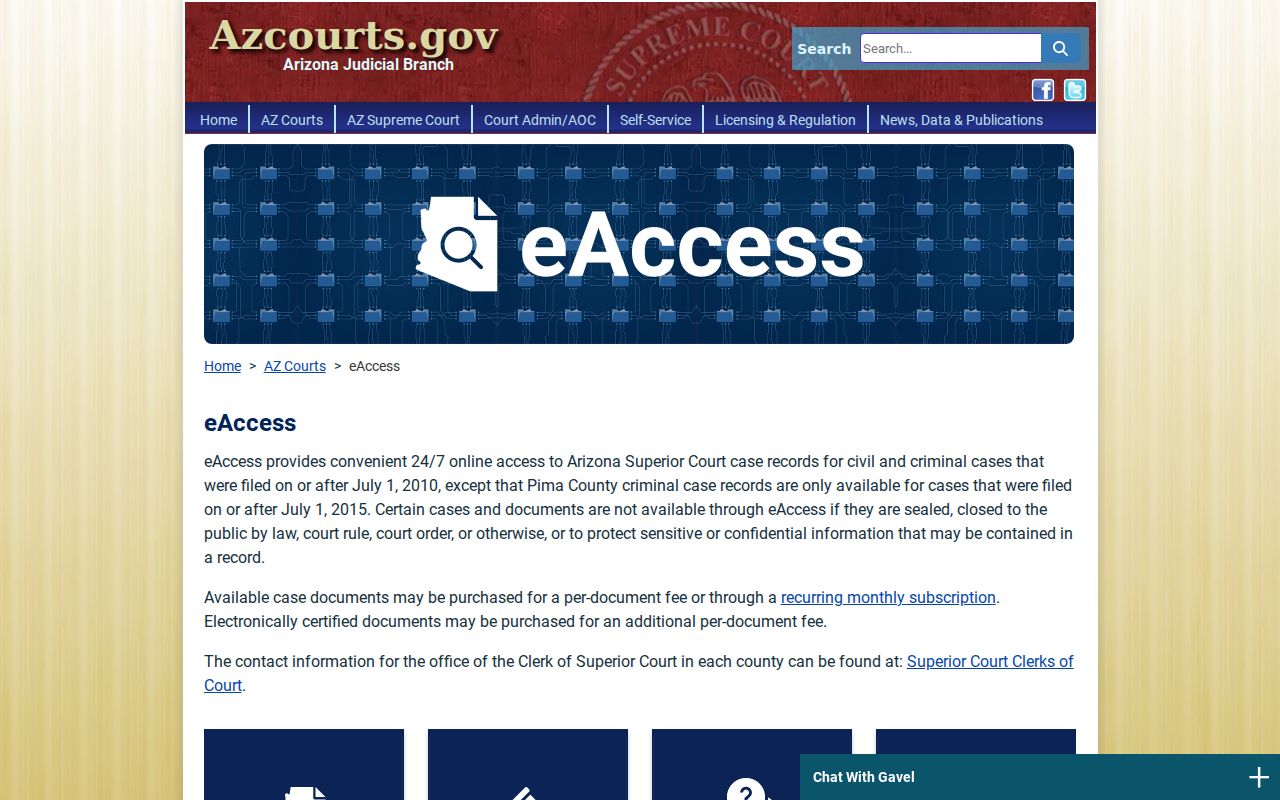
Use those dates to judge whether eAccess is a likely Arizona source. They do not promise that every eligible document is unrestricted or online.
What an Arizona Case Search Returns
A case lookup in Arizona gives you a quick snapshot, not the whole file. Expect the case number, the caption, party names, and the filing date. Many results also list the case status, the court location, and the judicial officer. Event history may appear too. It depends on the system and the court. One caution: a summary label on an Arizona result is not the document itself. The motion or order behind that label sits elsewhere. It is a separate filing within the court docket.
| Case number | The Arizona court-assigned identifier. Match its full prefix, punctuation, and digits. |
|---|---|
| Caption and parties | The case style and party roles; names may be shortened or withheld when rules require. |
| Court and location | Identifies the court that maintains the file and helps distinguish similar cases. |
| Case activity | Dated events or Arizona minute entries. A minute entry summarizes official acts; it is not a transcript. |
| Judicial officer and setting | May identify the assigned judge or commissioner and hearing details, subject to the local system. |
| Document link | May appear for an eligible public image, but an event can exist without a downloadable document. |
Arizona has no single statewide glossary of disposition codes. Labels can differ from court to court. When a docket entry reads like jargon, pull the linked order. Or simply call the Arizona clerk who maintains the case. Ask what the entry means. Treat the activity line as a pointer to the court file, never a substitute for it.
Arizona Unavailable Courts Need Another Route
A blank result does not end the hunt. Before repeating the same Arizona docket search, open the state's unavailable and partial courts list. Arizona Public Access pulls from 177 of 184 court sources, yet coverage is uneven. Some courts publish only certain case types. One Arizona court might show criminal matters while a neighbor posts just a partial slice of local records.
Check the court name and any limitation noted on the roster. Then compare it against your citation or notice. If the court is absent or the case type is excluded, go straight to that local court or call its clerk. The county directory hands off to the Arizona local court layer whenever the portal falls short. An empty result alone proves nothing about whether a case ever existed.
The Arizona court roster separates truly unavailable sources from partial ones. That narrows your next move without turning every gap into a confidentiality question. Read that coverage note first. Assume nothing about completeness until you have.
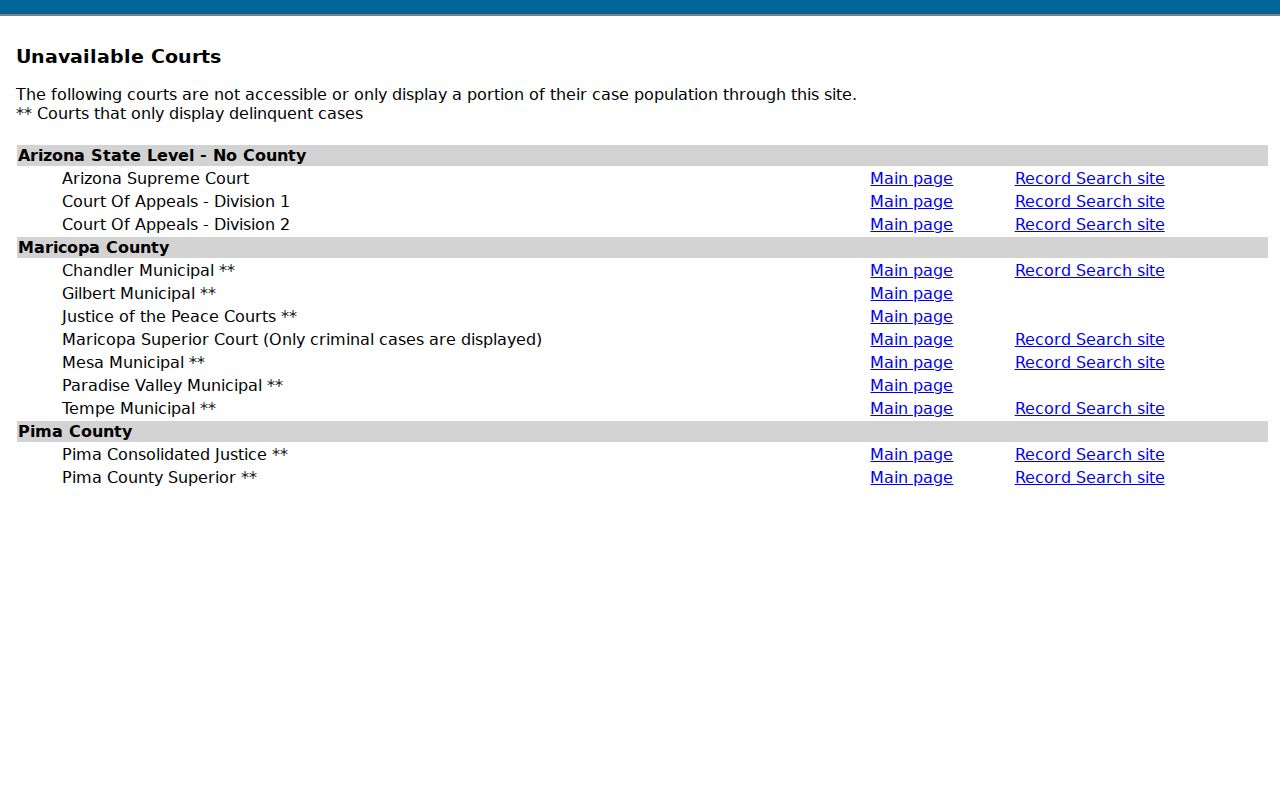
Sometimes the list settles nothing. In that case, ask the clerk named on the actual Arizona court record, since another office cannot be presumed able to search it.
Arizona Statewide vs County Search
Arizona Public Access is the place to spot participating cases across court systems. The docket sheet and official file live elsewhere. The Arizona county or local court holds them. Its own case management may carry a fuller event history, archived material, or a case population the state index never receives. That split matters most when you need an exact order, a current setting, or a certified court record.
| Need | Statewide Index | Holding Court or Clerk |
|---|---|---|
| Locate a participating case | Free Arizona Public Access search, subject to coverage and weekly refresh. | Can confirm a case in the Arizona court's local system. |
| Read the full docket sheet | May show summary case activity only. | Maintains the official case history and resolves local details. |
| Read a filed document | Public Access does not provide full document images. | eAccess may provide eligible Superior Court images; otherwise ask the local clerk. |
| Get a certified copy | Not issued by the statewide case lookup. | The clerk holding the case handles official copies and certification. |
Start locally with the Arizona county directory, which routes you to the right court. Justice Court and Municipal Court records belong to those courts' own clerks, not the Superior Court Clerk. The Judicial Branch posts Arizona Superior Court clerks county by county. Need a filing or a certified copy? The Court Record Search page covers those requests. For the bigger picture of Arizona filing and court layers, see the state court system overview.
Arizona Local Case Forms Vary
A local search page can ask for fields the Arizona statewide Public Access form never shows. One Arizona county civil search, for instance, offers separate routes by person name, business name, and case number. That is one court's design, though. It does not fix the fields for other Arizona counties or court levels.
Confirm the court and case type against your notice or citation before trusting any local form. Nor should you assume the statewide page carries the same name, date-of-birth, or court filters. When an Arizona local case lookup returns several matches, compare the number, the case type, and the filing court before opening a record.
The Arizona county search page displays the name, business, and case-number choices on a Maricopa Superior Court civil form. Every Arizona court builds its own interface and keeps its own case population.
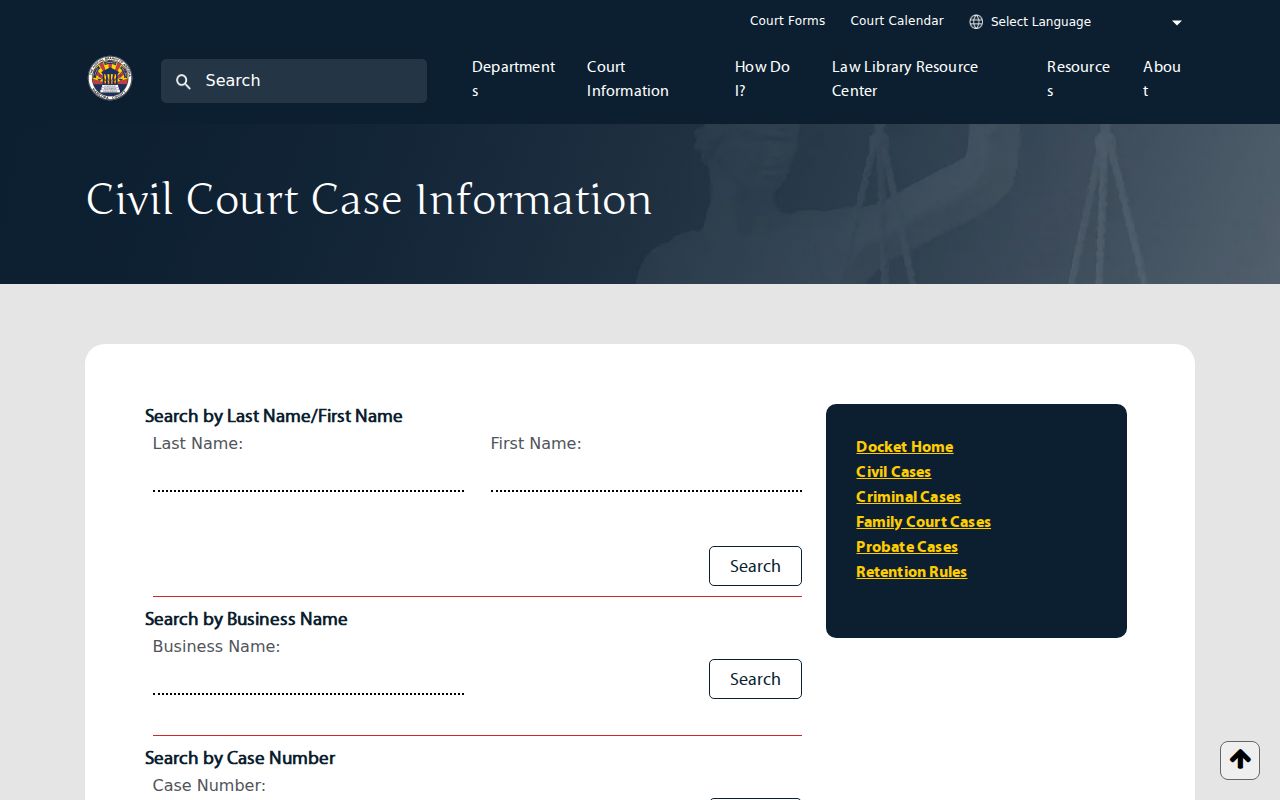
County variation, not a template. Treat this local form as one example of how counties differ, not as a verified inventory of the statewide portal's fields.
Advanced eAccess Filters Narrow Arizona Cases
The eAccess side of Arizona offers far more control than the public statewide lookup. Basic Case & Party Search takes a full or partial case number or party name. An Arizona Superior Court selector sits alongside it, defaulting to All Courts. Advanced Search opens the real power: filing date range, case number, party names, case title, judicial officer, and case type. Date presets run from Any Time to Past Day, Past Week, Past 30 Days, and Past Year.
Stack several criteria and the guide applies AND logic by default, with OR or NOT available for some fields. Results show ten per page and stop at a 1,000-result maximum; exports require a CAPTCHA. The guide does not print every dropdown option or result column, so stick to what Arizona actually publishes here. Remember, these filters refine an eAccess docket search, not Arizona Public Access.
Apply a court and date range only when you truly know the case. A wrong filing date or case type in a narrow filter can bury the match you want. The official eAccess search guide lays out the controls and worked examples.
Restricted Cases in Arizona
Arizona court records are open to the public under Arizona Supreme Court Rule 123 unless a law, a court rule, or a judge's order closes them. Public Access and eAccess also exclude certain records from their online services. A case can go missing from an Arizona docket search for three different reasons. The court may not participate. The case type may not be covered. Or the record itself may be restricted. Each reason points to a different next step.
Public Access leaves out sealed cases and protection-order matters. It also omits mental-health and probate populations, some juvenile delinquency information, local-ordinance charges, and protected victim or witness data. eAccess will not show Arizona Superior Court family, probate, or juvenile records, and it hides restricted documents. A blank result still means something. The court may hold the file even when the online service shows nothing. Ask the Arizona clerk what access is allowed for that specific matter.
Two statutes explain what a closed record can be. A.R.S. §13-911 lets a court seal eligible criminal case records by order, subject to statutory conditions and exceptions. A.R.S. §8-208 sets the confidentiality limits for juvenile records. Bear one caution in mind. A missing result does not prove a record was sealed. The holding court can explain the access route that applies.
Access rule: Arizona Rule 123 governs judicial case records. General public-record law does not turn every protected court file or detail into an online search result.
Arizona Appeals Have a Separate Case Number
Filing a notice of appeal opens a separately numbered Arizona appellate case. The trial court keeps its own file, and the appellate clerk holds the appeal papers, the briefing, the decisions, and the mandate. An Arizona trial docket may note that an appeal was filed. That note is only a note. It does not replace the appellate docket or its case search.
The Arizona appellate case portal links to active cases, indexes, calendars, opinions, minute entries, and case information. Its public system updates nightly, generally by 7 a.m., and not every filing gets posted. So treat the trial-court number as one record, not the whole story. When an Arizona appeal returns no result, or a closed matter is missing, use the appellate clerk's copy-request route instead.
Match the appellate number to the lower-court case before tracing an event. The two dockets cover different stages of the same dispute. They can also carry separate access rules and copy fees.
Arizona AOC Publishes Bulk Case Data
Arizona's person-level Public Access lookup and the Administrative Office of the Courts' bulk-data service are built for different users. The public portal handles one Arizona case search at a time, with its own CAPTCHA and coverage limits. AOC, separately, offers bulk case data and customized reports through an annual subscription or a dissemination agreement. That channel serves institutions. It is not an expanded button inside the ordinary Arizona court docket search.
This is why a member of the Arizona public should not expect a bulk download or a public API from a single case result. For one specific case, use Public Access, eAccess where eligible, or the local clerk. A public-data request that AOC holds goes through the AOC's Arizona administrative record process. That process does not replace county case-file access.
Arizona court search services expose different layers. The statewide index, the document portal, and bulk reporting are not one database. Match each Arizona request to the office that actually holds the record.